

Journal/Getting found on Google
How to structure a small-business website so Google understands it
Google finds its way round your site the same way a visitor does: by following links. A clear structure helps both of them.
15 November 2026·2 min read
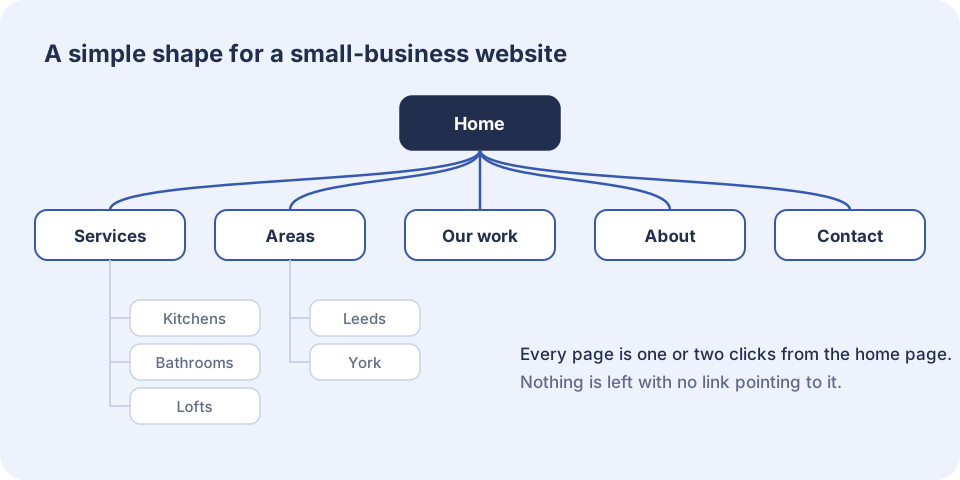
Google discovers pages by following links from one to the next. A page that nothing links to may never be found. A page buried five clicks deep looks unimportant. So the way your pages are arranged, and how they link to each other, tells Google what your business does and which pages matter most.
A simple shape that works
- A home page that says what you do and where, and links to everything important.
- One page for each main service.
- One page for each real area or branch, if you have more than one.
- A page showing your work, with real jobs.
- A page about the business: who you are and why to trust you.
- A contact page, with the same details that appear on every page.
Every one of those should be reachable from the menu or the home page in one or two clicks.
Link your own pages together
Links inside your own site are free and fully in your control, and they are often forgotten. When the kitchen page mentions worktops, link the word to the worktops page. When a case study shows a loft conversion, link to the loft conversions page. Each link helps a visitor find the next thing and tells Google the two pages are related.
The words in the link matter too. "See our loft conversions" tells Google what the next page is about. "Click here" tells it nothing.
Keep addresses readable
A page address such as yourcompany.co.uk/loft-conversions is easy for people to read and share, and it gives Google one more clue. An address full of numbers and question marks gives none. Once a page is live, try not to change its address. If you must, set up a redirect from the old one so that links and rankings follow.
Common problems
- Orphan pages that nothing links to.
- Two or three pages competing for the same search, each one too thin to win.
- Menus with twenty items, where nothing stands out.
- Old pages left live after a redesign, sending visitors to dead ends.
- A new site launched without redirects, so every old link breaks at once.
That last one is the most expensive mistake a rebuild can make. When we replace an existing site, we list every old address and point each one at its new home before launch, so the rankings you have already earned are not thrown away.